
Type a word and its meaning
Write perro = dog and it's yours. No account, no key, nothing leaves your browser.
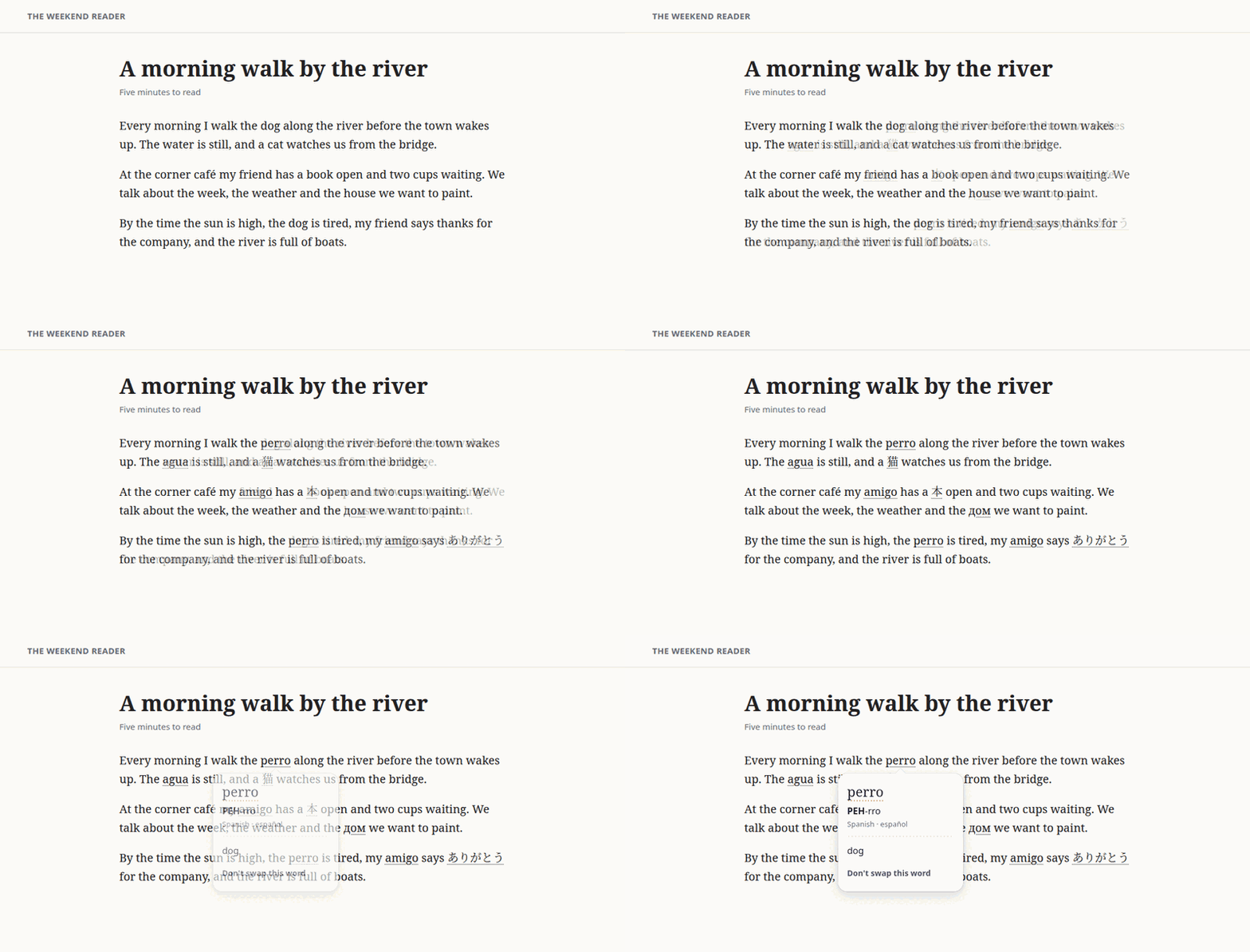
Kotiko is a browser extension. You read the news, a recipe or a forum as you always do, and here and there a word you chose appears in the language you're learning: perro, 猫, спасибо. Point at it, or tap it, to see what it means in your language and how it's said.
It works on pages in the languages you read, whichever they are. A reader in Madrid sees "perro" become 犬 on Spanish pages; a reader in Toronto sees "dog" become 犬 on English pages. Kotiko never assumes you read English.
Type a word and its meaning
Write perro = dog and it's yours. No account, no key, nothing leaves your browser.
Connect a free AI key
With a free OpenRouter key, ask in your own words: "how do you say cat in Japanese". Set up OpenRouter.
Use your own model or server
Another AI service, a model on your own computer, or your own Kotiko server with a Telegram bot.
Until the store listings are live, you can install Kotiko from its source.
Read the privacy policy: it takes about two minutes.

Kotiko's mascot is a small black kitten. Kotiko bends котик (kotik), Russian for "kitty", the way a learner bends a word they're still getting to know. And Mira's name is a clue: in Spanish it means "look", in Latin "wonderful", in Russian "of the world" and "of peace". Read the whole story.